Professional Skill Library
Skills are project functionality, not dataset caches. They guide GPT's scientific judgement without replacing natural-language interaction or granting execution permission. Web and CLI share the catalog, full-text loader and validated tools.
See the 34-skill selection guide for each package's motivation, role, selection cues and a natural-language example. See explicit assay tables for newly executable processed-table QC, quantification and the separate RNA count contrast capability.
Hierarchy and Storage
There are 34 maintained packages, organized physically and logically:
| Project folder | Role | Packages |
|---|---|---|
skills/orchestration/ |
Intent, evidence, review, memory curation and assay routing | liquid-biopsy-analysis, reflective-learning, memory-curation, assay-routing |
skills/shared/ |
Reusable scientific methods | local-model-setup, task-memory, task-handoff, linked-task-synthesis, data-intake, local-data-privacy, cohort-design, feature-encoding, result-region-followup, scientific-visualization, scientific-reporting, literature-review, genetics-dna-analysis, genomics-epigenomics, cancer-research |
skills/assays/ |
Assay-specific guidance | raw-sequencing, genomic-tracks, fragmentomics, ctdna-variants, copy-number, methylation-bisulfite, methylation-enrichment, methylation-arrays, cell-free-rna, small-rna, plasma-proteomics, plasma-metabolomics, extracellular-vesicles, circulating-tumour-cells, digital-pcr |
Personal-information directory / skills/ |
Locally learned notes and preferences | Private user-created packages |
Each package contains SKILL.md; detailed evidence lives in references/.
Frontmatter metadata.parent defines inheritance. Assay specialists inherit the
assay router and top-level guidance. Shared methods inherit top-level guidance.
Stable skill IDs do not depend on folder tiers. Existing workflow.yaml files
remain QC/capability hints, not mandatory end-to-end execution scripts.
User-learned skills live under skills/ in the personal-information directory chosen during installation, independently of research inputs. liquid-agent skills root displays the actual location. LIQUID_AGENT_USER_DATA_DIR takes priority; without it, LIQUID_BIOPSY_SKILLS_ROOT can select a separate library, otherwise the OS configuration directory is used. Earlier project-local libraries are not silently moved or deleted: explicitly import chosen packages. Do not commit private notes.
How the Agent Uses Skills
- Receive user intent, conversation context and compact skill metadata.
- Inspect actual inputs and available computational prerequisites as needed.
- Select relevant full guidance with
load_skill, including its ancestors; read a listed reference when useful. - Answer, clarify, plan or execute an authorized tool according to user intent.
- Interpret actual results and propose a focused next question from the evidence.
Catalog matching ranks metadata; it does not classify commands or force a fixed workflow. Capability questions are not permission to execute. Users can ask off-plan questions or select another supported operation.
Loaded instruction hashes are recorded for provenance. Web's Skills panel shows
the same hierarchy, full instructions and source notes. The legacy
/skills context diagnostic shows bounded excerpts; the new GPT controller uses
the full-loading tools instead.
Loading is bounded to five ancestor levels, 20 KB per instruction document and
48 KB per chain. References are text resources inside the selected package,
limited to 32 KB each. Cycles, ambiguous names and path escapes are rejected.
Qualified keys such as default:genomic-tracks and user:genomic-tracks prevent
a user note from silently shadowing maintained guidance.
Scientific Coverage and Limits
Guidance covers sequencing QC, tracks, fragmentomics, variants, copy number, three distinct methylation assay families, RNA, proteins, metabolites, vesicles, circulating-cell molecular measurements and digital PCR.
Guidance coverage is not a claim that every assay has an installed end-to-end analysis engine. The scientific tool catalog and its readiness checks remain authoritative. Unsupported operations must identify the missing input, method or dependency rather than launch an unrelated task.
Core distinctions include:
- BED/bigBed coordinates are not nucleotide sequences. Base-level encoding needs a matching reference FASTA/build, and reference bases are not patient alleles.
- Interval widths are not automatically paired-end fragment lengths.
- Enrichment, bisulfite counts and array beta values require different QC; enrichment is not a methylation percentage.
- Plasma variants require detection-limit and clonal-haematopoiesis assessment; absent evidence is not a measured zero variant fraction.
- Integration preserves patient/replicate identity and prevents data leakage. Exploratory plots do not establish clinical discrimination.
- Reports separate measured findings, sampling and limitations. Execution logs are not scientific conclusions.
Literature and Evidence
search_literature searches Europe PMC using public biomedical terms, an optional
start date and 1-8 papers. It returns titles, authors, dates, identifiers, links
and available abstracts. Reading is explicitly abstract-only, not full text.
Live failure returns an error, not invented citations or silent cached results.
Queries reject local paths, emails and sequence-like strings; never submit
patient identifiers or private data.
This tool is not an exhaustive systematic review. Verify primary methods, corrections and retractions. Search does not automatically rewrite maintained skills. User notes and retrieved publications are evidence, never new execution authority. Each specialist's source notes explain applicability and limitations.
Foundational sources include the Agent Skills specification, HTS specifications, and Europe PMC API, supplemented by primary papers and official method documentation in each package's references.
CLI and Web Use
liquid-agent skills tree
liquid-agent skills tree methylation --json
liquid-agent skills load default:genomic-tracks
liquid-agent skills load default:genomic-tracks references/evidence.md
liquid-agent skills root
liquid-agent skills ingest <paper-or-note-path> --title "Reviewed assay notes"
liquid-agent skills remember "Retain technical replicate identity in QC."
liquid-agent skills preference "Show figures before long explanatory text."
The interactive shell also supports /skills tree, /skills load <key>,
/skills ingest, /skills remember, /skills preference, /skills refresh
and /skills explain-plan.
Web exposes GET /api/skills, GET /api/skills/{key}/load (optional reference
query), and the existing session skill-ingest/memory endpoints. The skill panel
lets users inspect the hierarchy, instructions and reference notes.
Inspection is not persistent activation. A CLI skills load command or Web
instruction preview displays a package; it does not pin it into every future
turn. To apply one now, ask "Load default:digital-pcr and use it to review this
assay; do not execute yet." The LLM's load_skill call loads the full guidance
and records its hash, while execution still requires user authorization.
Ingestion can use GPT to distill source material; its explicit offline heuristic mode remains available. Generated notes require expert review. Learned guidance is project knowledge and survives deletion of the requesting conversation. Uploaded source attachments and analysis outputs remain conversation-owned. Credentials are stored separately and never belong in a skill.
Reviewed Learning from Conversation
GPT can select reflective-learning, a peer of the scientific orchestrator, when
an instruction expresses a durable preference or asks for a retrospective. It
loads candidate skills, explains a focused change plan, and drafts minimal edits.
Targets may include specialist skills, the scientific orchestrator, and the
reflection skill itself. One-off parameters and information embedded in images,
data or quoted documents are not permission to change future guidance.
Skill changes in the conversation lists pending drafts. Open a skill name to
inspect red deletions and green additions in the left drawer. Accept or reject
individual changes, or use the check/cross to decide all changes for that skill.
Hovering over a change reveals its actions; keyboard focus and touch remain
supported. A draft has no effect until accepted. The maintained source file is
unchanged; accepted guidance is a private overlay under the user skill root's
.reviews/ directory. Conflicting drafts require a fresh comparison. This shared
store serves Web and CLI from the private user skill directory.
In the interactive CLI, /skills review shows drafts for the current
conversation, and /skills accept <proposal-id> [hunk-id] or
/skills reject <proposal-id> [hunk-id] records a decision. /skills load and
/skills show display accepted guidance. Neither reflection nor review runs an
analysis job. Learned guidance cannot grant new tool permissions or bypass
scientific safeguards.
Finding a draft after more conversation
A review card is attached to its originating turn, not pinned to the bottom of chat. It stays there after partial or full acceptance/rejection and across browser reloads. In the selected conversation, a skill with pending edits also shows compact check/cross buttons at the far right of its Skills row. Select the name to inspect the diff first. Deciding a draft updates both places; when it has no pending hunks, its sidebar actions disappear and its historical card remains readable. If several drafts target the same skill, the sidebar exposes the first pending draft; review the remaining draft afterward. Conflicting drafts still require rejection and a fresh proposal.
See full-interface review screenshots.
Live review example
During the real GSE174302 workflow, the user requested three plain-language findings, comparison figures before dense tables, and explicit PCA/heatmap caption caveats. The API used the reflection workflow and drafted two changes: reporting and scientific visualization. Nothing was preloaded as a pretend assistant answer.
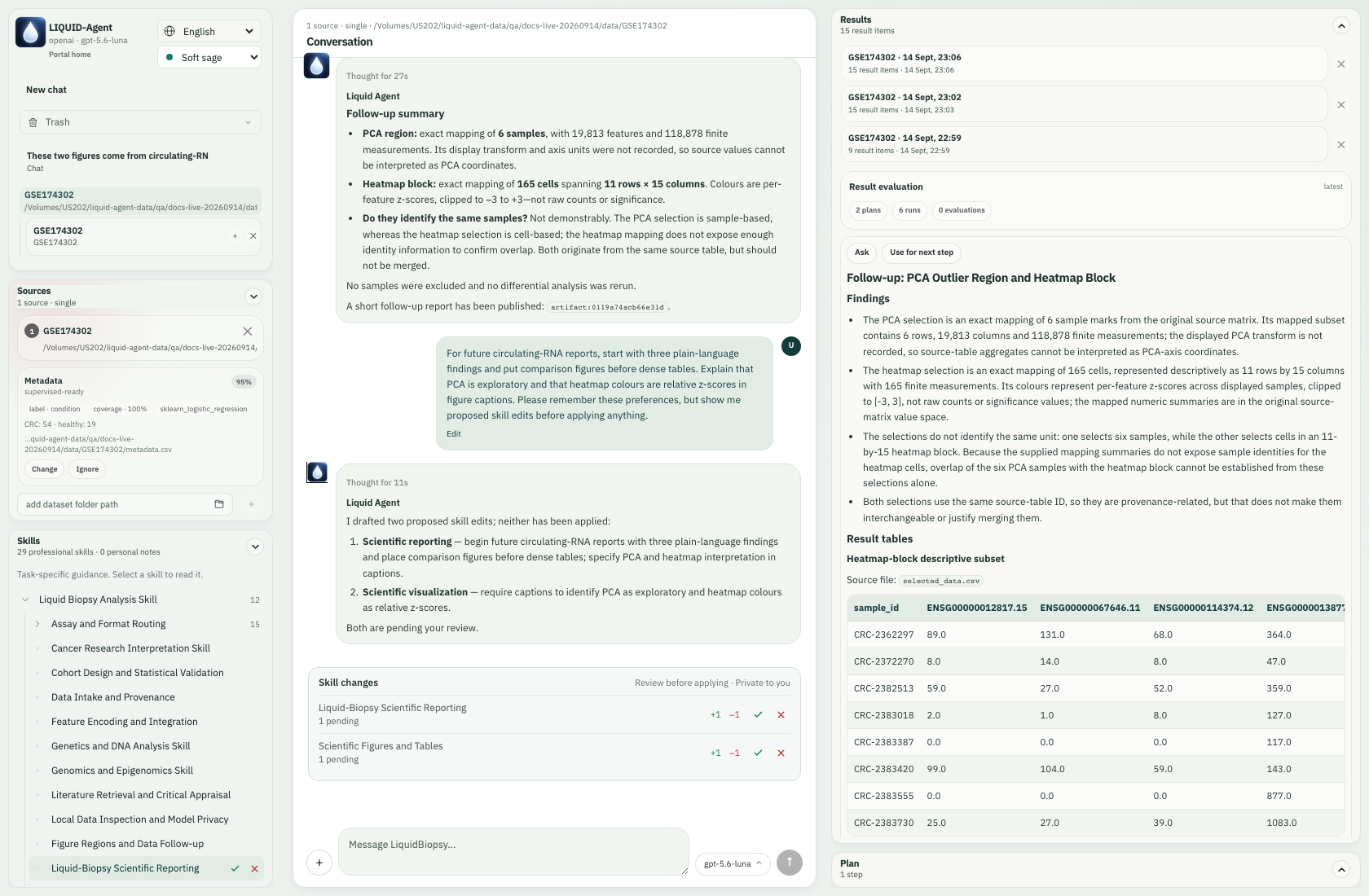
The actual preference and two pending drafts appear in conversation; the reporting skill also has right-side review controls.
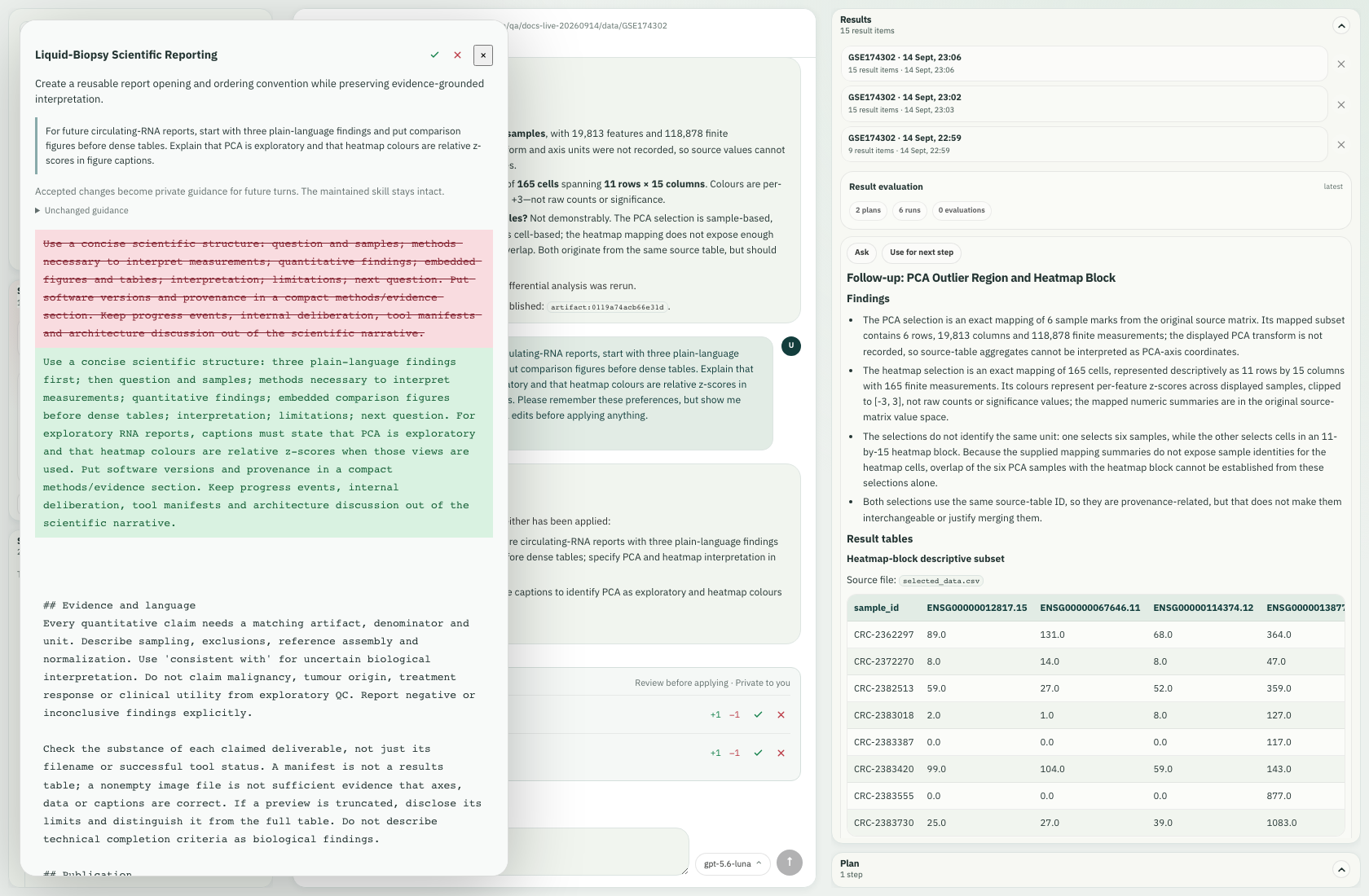
Opening the reporting draft shows red deletions, green additions and the user instruction that motivated it.
We accepted the reporting hunk through Accept change 1, then rejected the separate visualization draft using its small cross at the far right of the Skills row. This demonstrates selective decisions; the accepted reporting draft already included the requested report-caption guidance. A rejected change does not become private guidance.
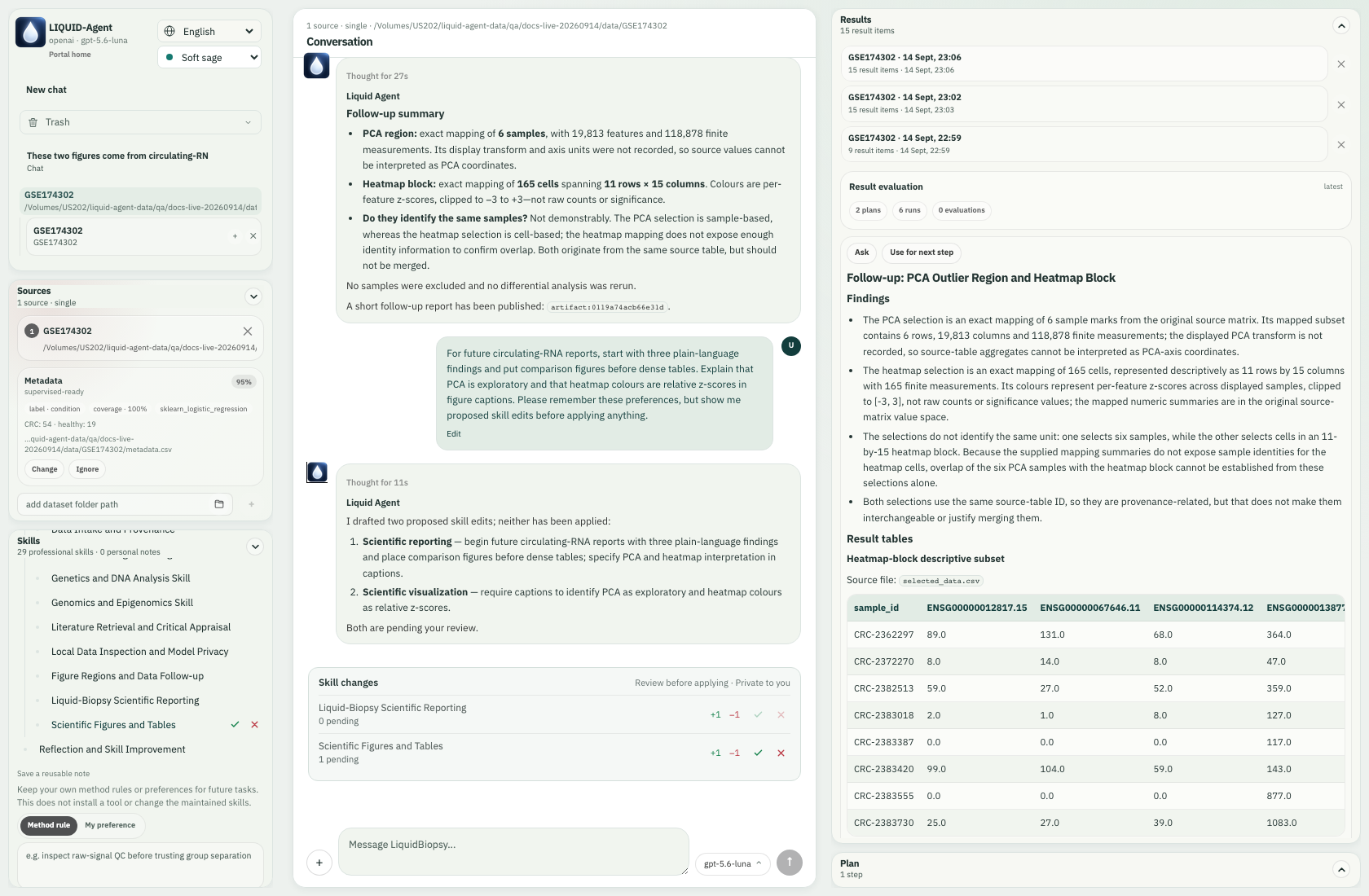
The remaining figure-skill draft can be reviewed or rejected from its own Skills row.
A later report request used the accepted guidance. The two draft cards stayed beside the original preference turn instead of following every new message to the bottom. The earlier six scientific runs were reused. Accepting a skill change changes guidance for future turns; it does not rewrite existing reports until you ask for a new report.
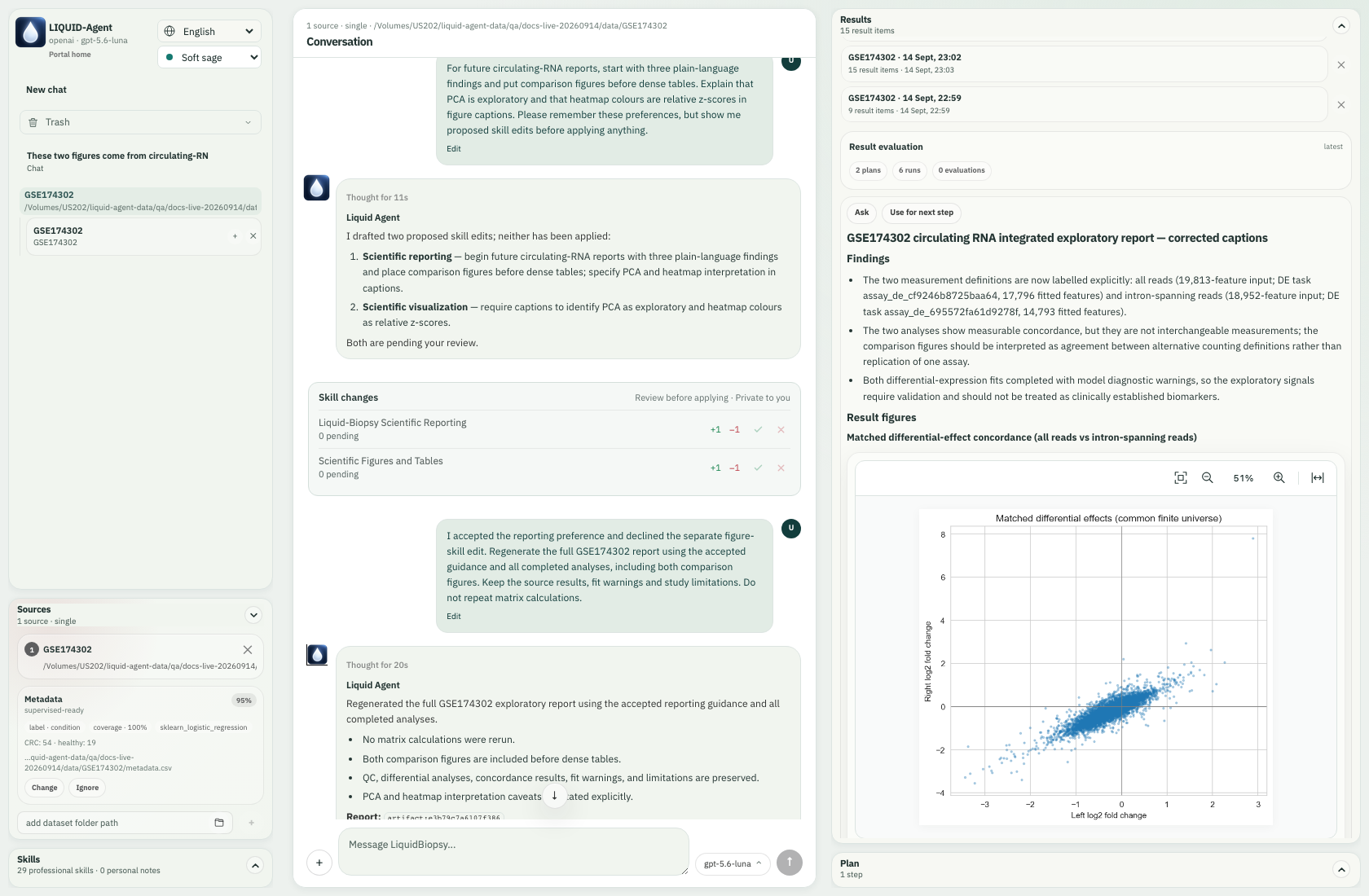
After later conversation, the review card remains in its original place in history.