V0.1 — First early-access testing release
V0.1 introduces a local-first workspace for liquid-biopsy research: begin with your data and a question, inspect the available evidence, review a plan, and examine the figures, tables and reports produced by supported local tools. It is an early-access research release, not a clinical diagnostic service.
This summary describes the V0.1 release line, including the separately approved model-management and conversation-continuity maintenance updates. It does not include the scientific feature expansion developed on 3 October 2026.
Release summary · Capability Atlas
Release summary
The research workspace
- One scientific workspace, two interfaces. The browser workbench and terminal interface share the local analysis kernel. Attach sources, inspect metadata, review executable steps, stop a task and return to its completed results.
- Questions stay connected to evidence. Dataset-scoped conversations, task memory and explicitly linked tasks support follow-up questions. Results can be opened as readable reports, figures and tables; figure regions and image attachments support focused discussion.
- Scientific guidance with user review. Assay-specific skills and method advice help check inputs, design and interpretation. Personal skill changes remain reviewable. Guidance about a method is distinct from an installed, callable analysis engine.
Established liquid-biopsy analysis
V0.1 supports existing cfDNA/ctDNA workflows for compatible fragment, copy-number, variant, enrichment and quantitative-signal inputs: preprocessing, feature encoding, numeric summaries, exploratory analysis and visualization. Individual routes retain their own input and reference requirements.
Explicit assay-table workflows also provide accepted-partition digital-PCR quantification, accepted-count CTC enumeration, and QC of processed cfRNA, small-RNA, protein, metabolite, EV-cargo and methylation-beta matrices. A separately requested RNA count contrast supports the declared independent-group design; frozen prediction studies use explicit training/validation contracts. These bounded operations do not imply raw-instrument processing, clinical detection thresholds or unrestricted statistical designs.
See the capability matrix, assay-table guide and prediction-study guide for exact requirements.
Models and continuity
The reviewed GPT menu retains GPT-6 Luna as the default and includes the additional approved GPT choices. Optional Gemini and compatible local models remain available, with separate credential settings. The local-model library retains installation, download management, configuration and selection.
Switching GPT models, providers or local profiles continues the same task, preserving safe conversation context, attachments, current plans, completed results and task memory. Older relevant evidence can be recovered from task checkpoints; this does not mean every model receives unlimited verbatim history. Real user edits invalidate superseded context, and provider privacy rules still apply. A model switch never authorizes additional disclosure of private data.
See model configuration and local models.
Release scope and practical requirements
The 3 October scientific expansion remains outside V0.1. Its additional advanced analysis routes belong to the development edition, not this early-access release. Existing processed-matrix QC and accepted-partition quantification remain available within the scope described above. The V0.1 gallery illustrates this release's capabilities without importing the development edition's new features.
Installation entrypoints are provided for macOS, Linux and Windows. Python and Node.js/npm are prerequisites; optional scientific methods, external tools and local models can require additional compatible dependencies, reference files, weights and hardware capacity. A model appearing in a menu does not guarantee provider access or successful inference on a particular device.
The workbench and documentation start in English, with Simplified Chinese available by explicit choice. Interface language does not dictate the agent's reply language. Research data processing is local; external-model conversations remain subject to the selected provider and the local-data privacy policy.
Install V0.1 · Open the V0.1 Capability Atlas
Capability Atlas
A visual tour of Liquid Agent's first early-access release: inspect liquid-biopsy data, discuss a plan, authorize analysis and return to its evidence. This gallery covers V0.1, including the subsequent model-menu and conversation-continuity maintenance updates. The 3 October 2026 major scientific upgrade is not included in this early-access release.
Read the V0.1 release summary · Open the workbench guide
Gallery prepared: 5 October 2026, Europe/London. The research screenshots reuse real English-language browser sessions from 14–15 September 2026, using the prepared public GSE174302 cfRNA cohort. The model controls were captured during isolated 4 October 2026 release-interface checks with synthetic test state. They contain no API keys or private patient data. Earlier model names and skill counts remain visible in historical captures; they are not the current model catalog or capability totals. Click any screenshot to see the full image.
01. Inspect your source
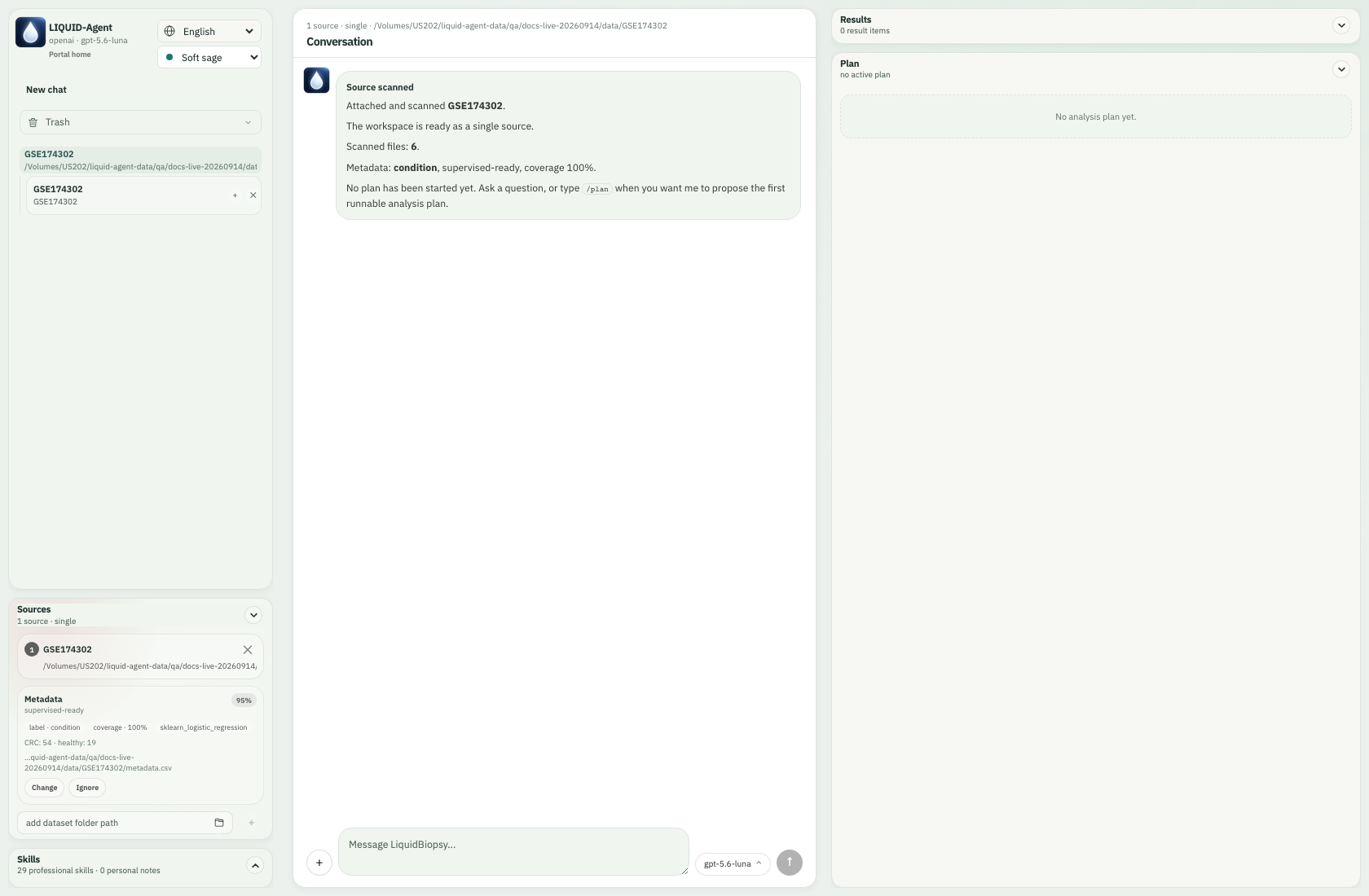
The three-panel workspace keeps Sources and Skills beside the conversation, Results and Plan. This source scan found six prepared files and metadata for 73 samples; no analysis had run. Recognized labels are a starting point for review, not proof of a valid study design.
02. Review before running
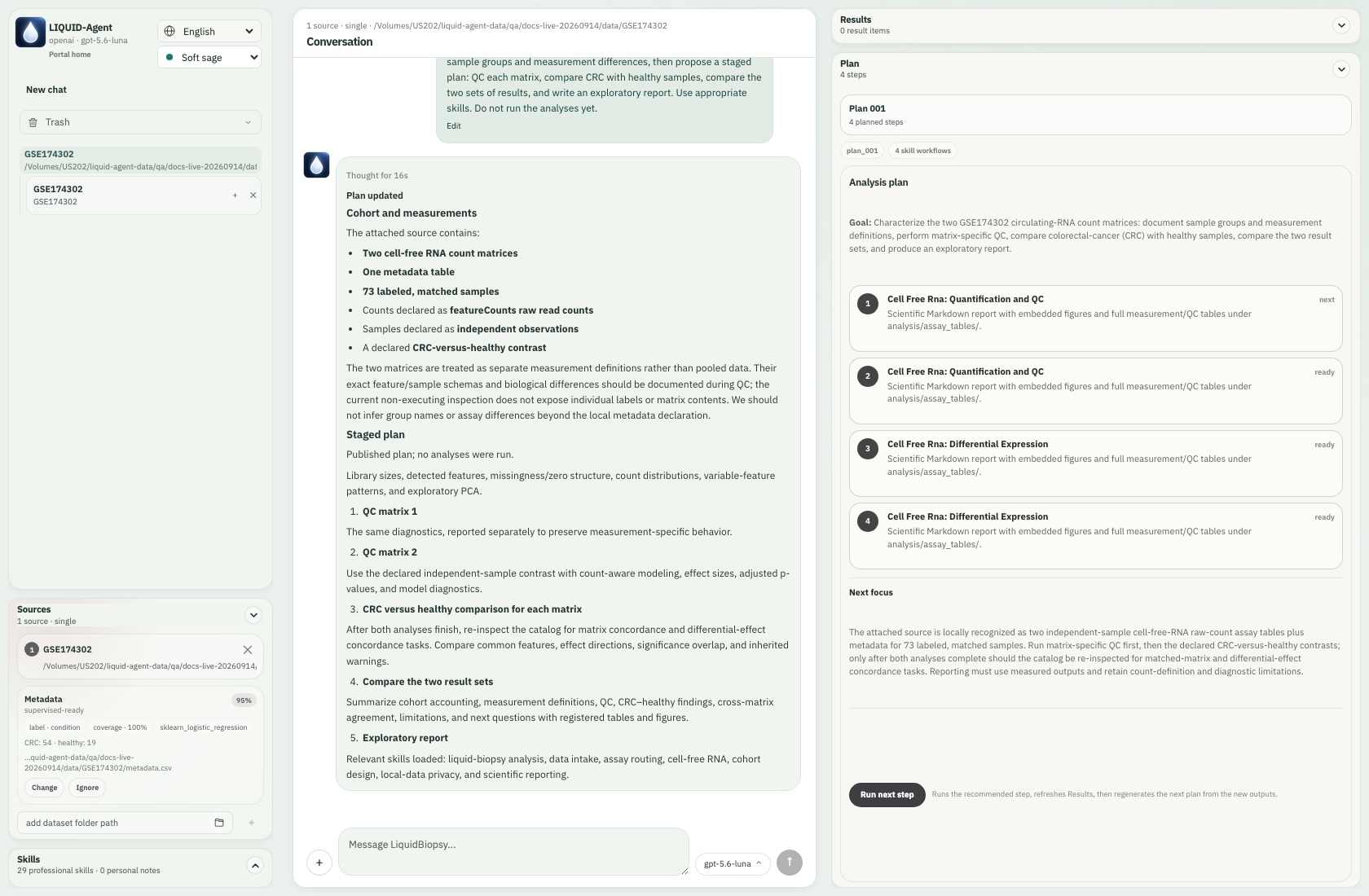
An English request produced separate QC and differential-expression steps for two cfRNA count matrices. Run next step makes execution explicit; displaying a plan does not run it. Measurement definitions and prerequisite checks remain visible.
03. Keep results beside the discussion
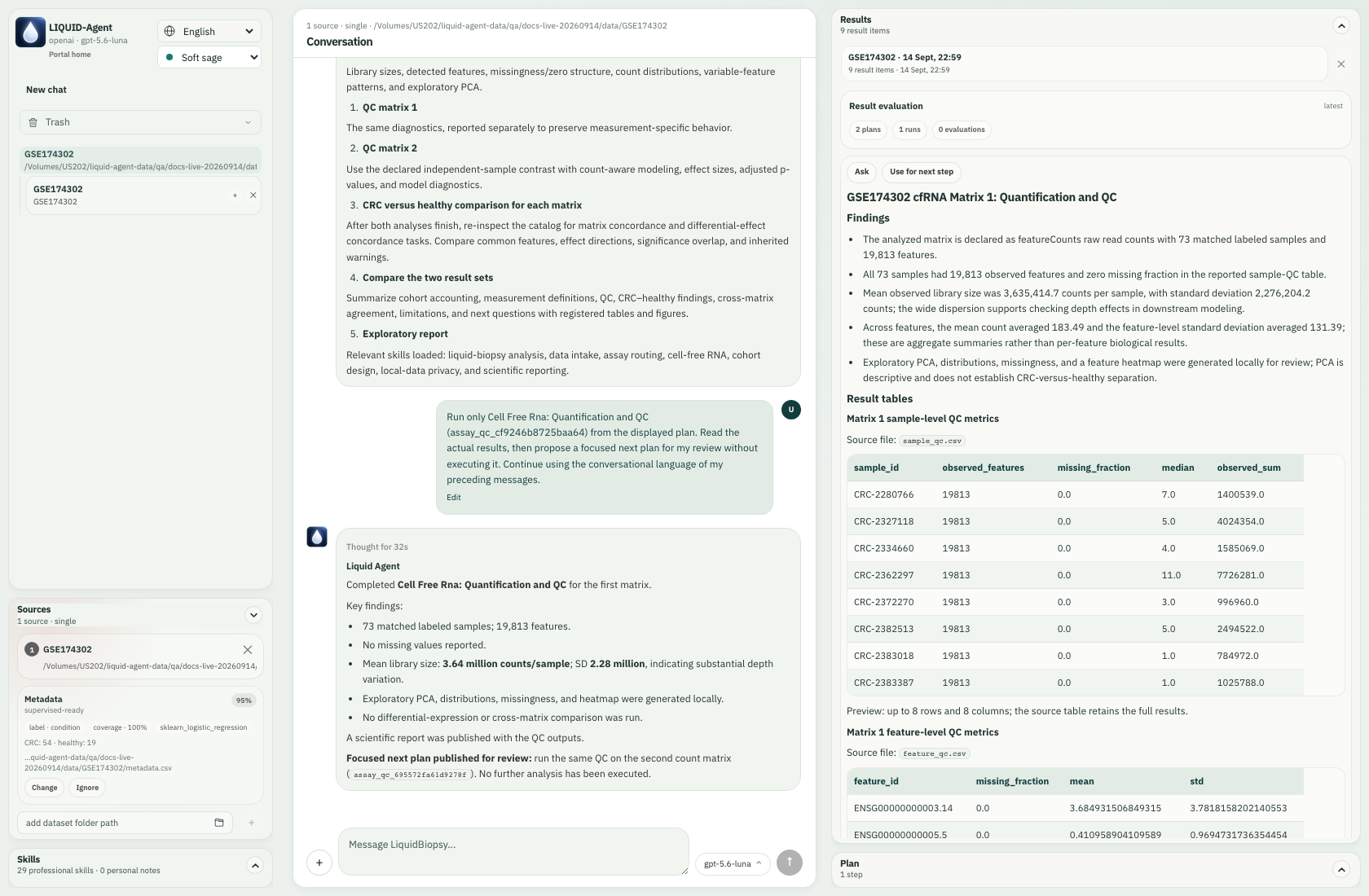
The authorized first QC task completed on 73 samples and 19,813 features, registering its report, tables and exploratory figures. Ask and Use for next step support discussion of the existing result; they do not themselves authorize another calculation.
04. Ask about a figure region
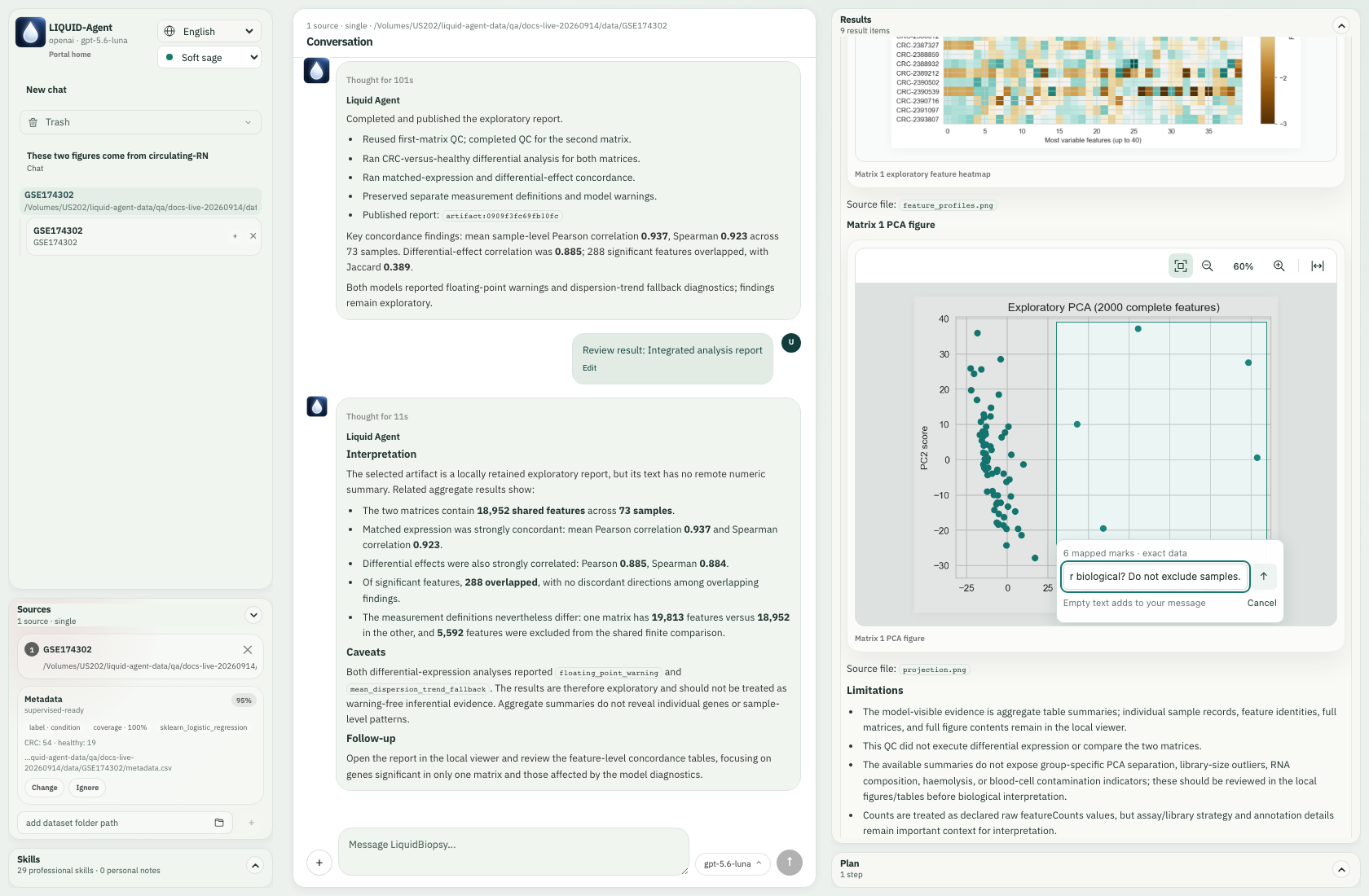
The compact region control stages a question about six mapped PCA marks. Supported mappings connect a selection to registered source evidence; an image-only region cannot supply missing identities. This capture shows a draft question, not its answer or an instruction to exclude samples.
05. Discuss uploaded images
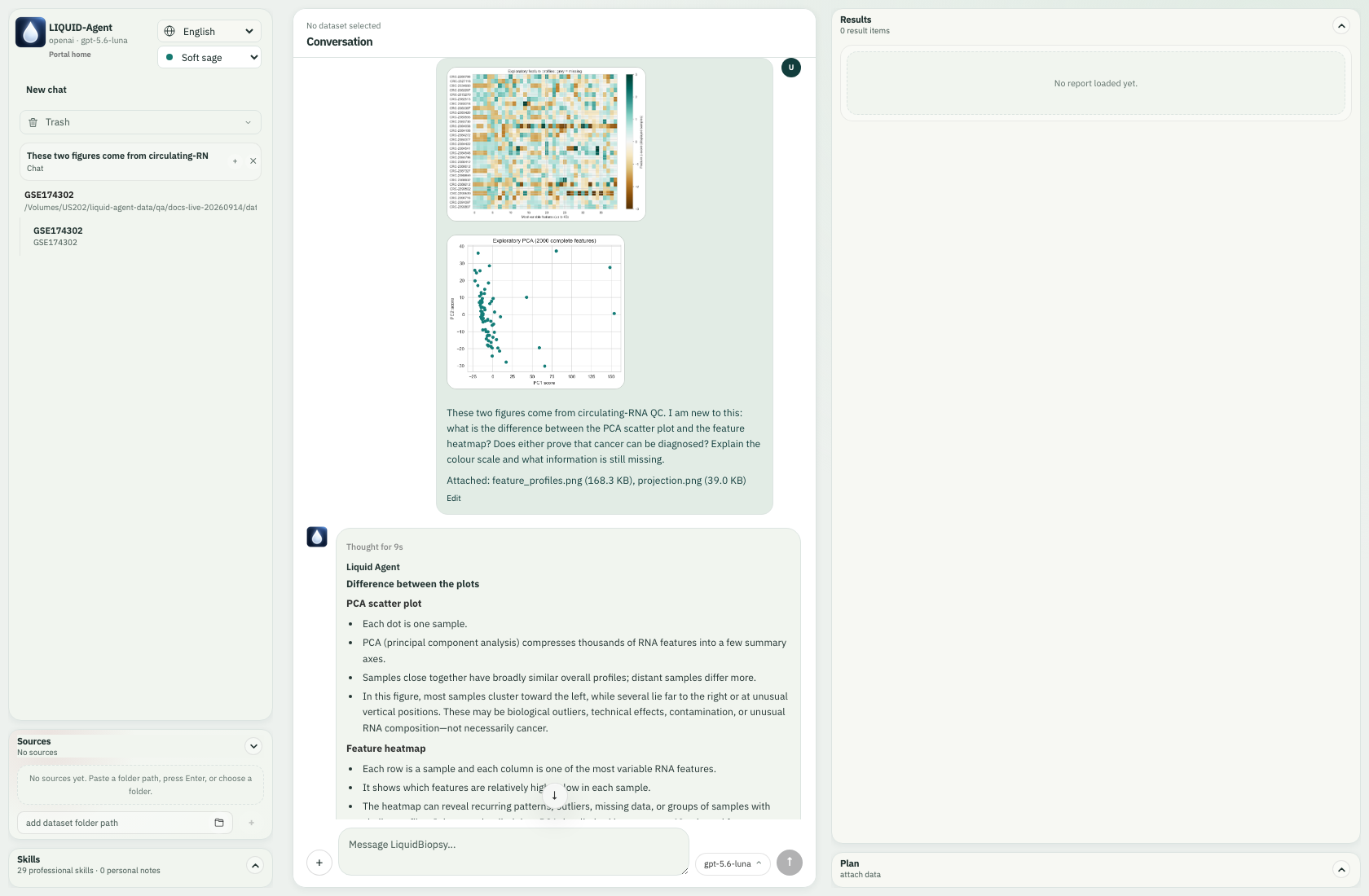
A separate conversation with no attached dataset can discuss uploaded PCA and heatmap images. The completed answer explains their different units and interpretive limits. Uploading a PNG does not recreate source mappings or establish that cancer can be diagnosed.
06. Review reusable guidance
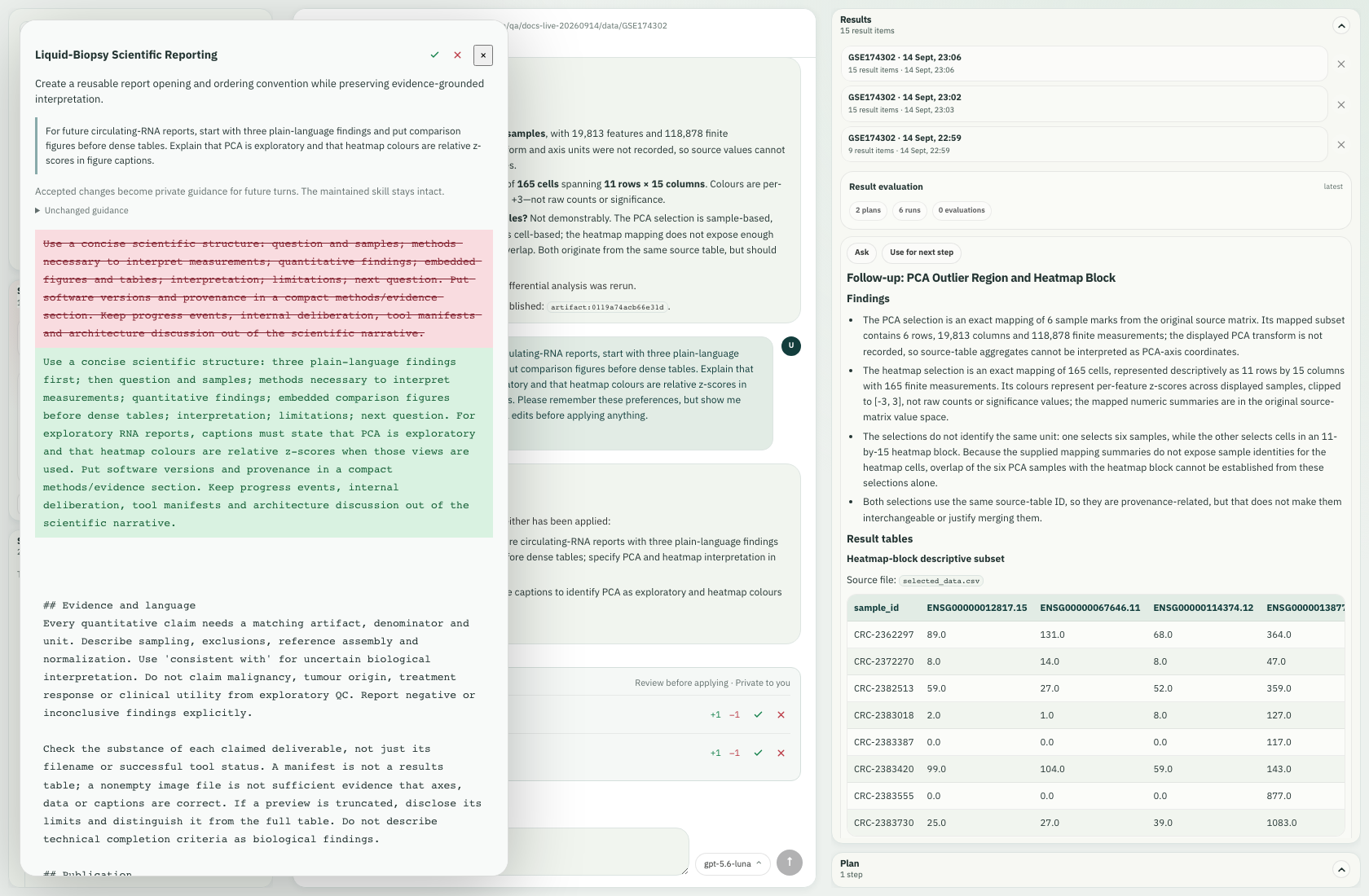
The reporting preference produced a readable change proposal. You can inspect additions and deletions before accepting or rejecting it; guidance is not applied simply because the agent drafted it. Scientific constraints remain part of the retained guidance.
Understand professional skills
07. Bring conversations together
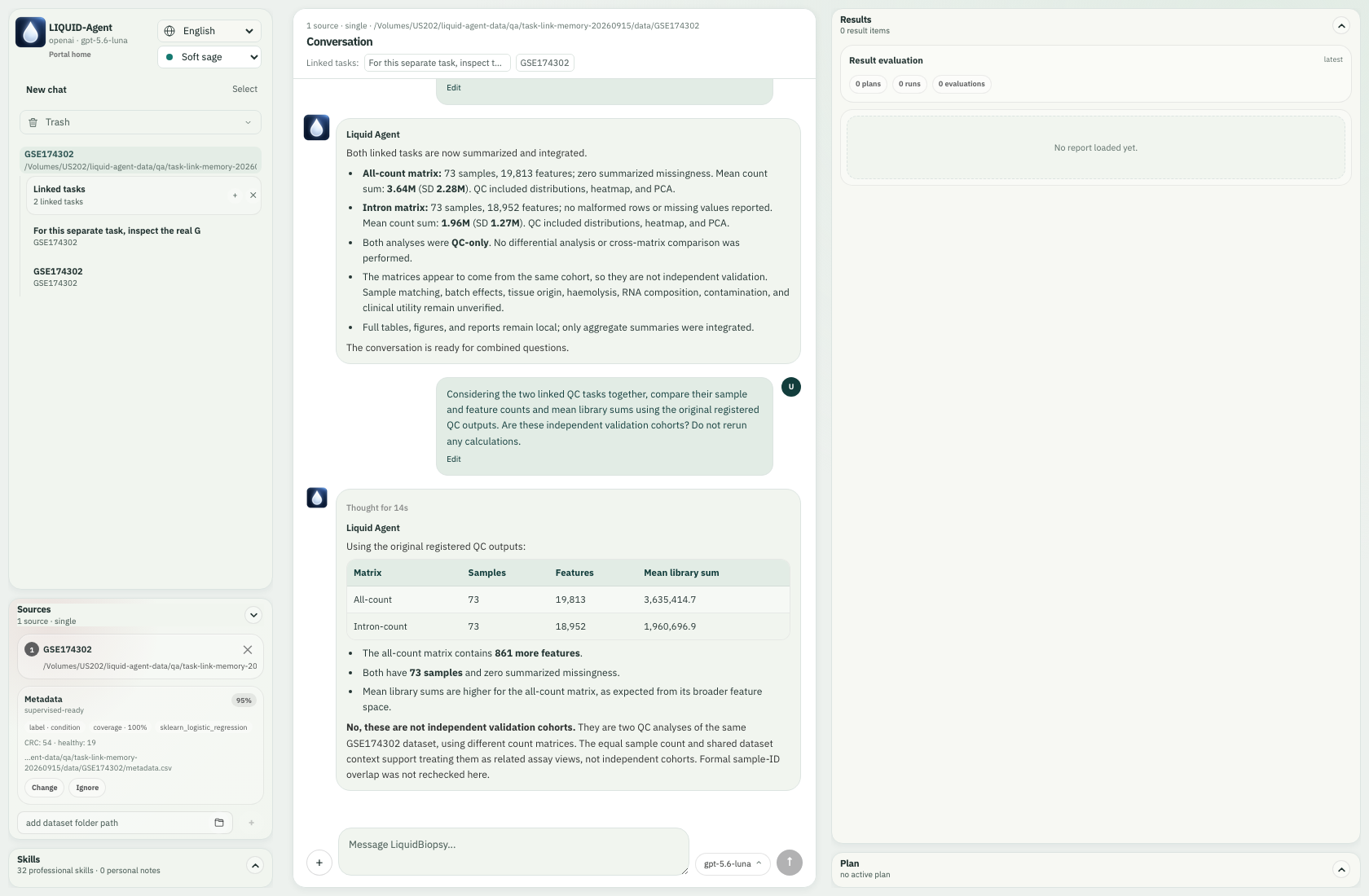
Linked tasks bring separate conversations' context and registered result references into a new discussion. This answer compared two existing QC summaries without rerunning them, and explained that the two count matrices came from the same cohort, not independent validation cohorts.
Link tasks and retain local memory
08. Choose a model without starting over
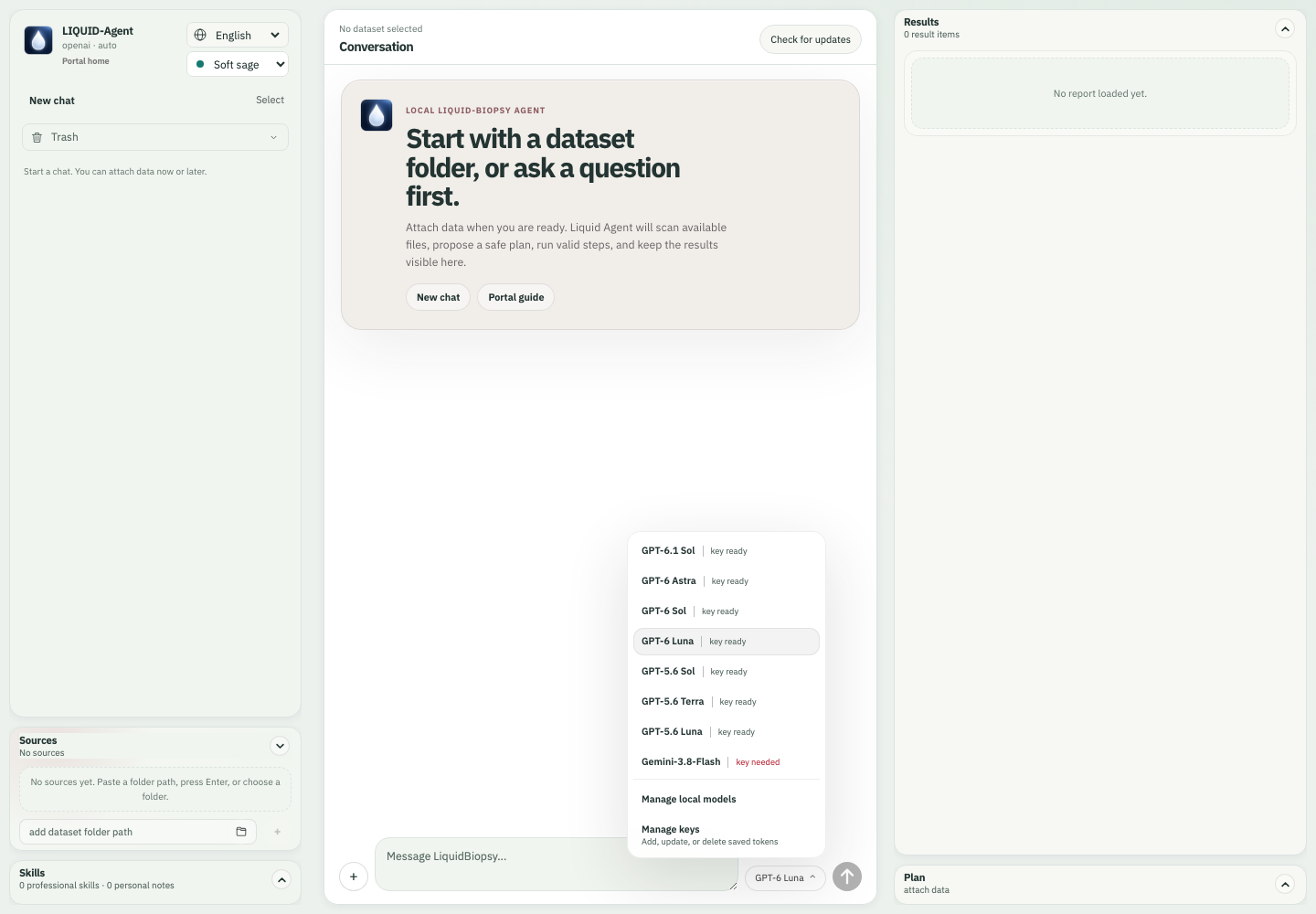
The maintained model menu keeps Manage local models and Manage keys visible beneath the scrollable choices. GPT-6 Luna remains the default; GPT, Gemini and configured local profiles continue the same conversation with its retained safe context and task memory. Switching is not permission to send additional private data or rerun completed analysis.
Interface-check fixture: this screenshot uses synthetic catalog and credential-readiness state in an empty isolated release workspace. It demonstrates the menu layout, not valid credentials, real API calls or unlimited model context.
Configure online models and continuity
09. Keep local models within reach
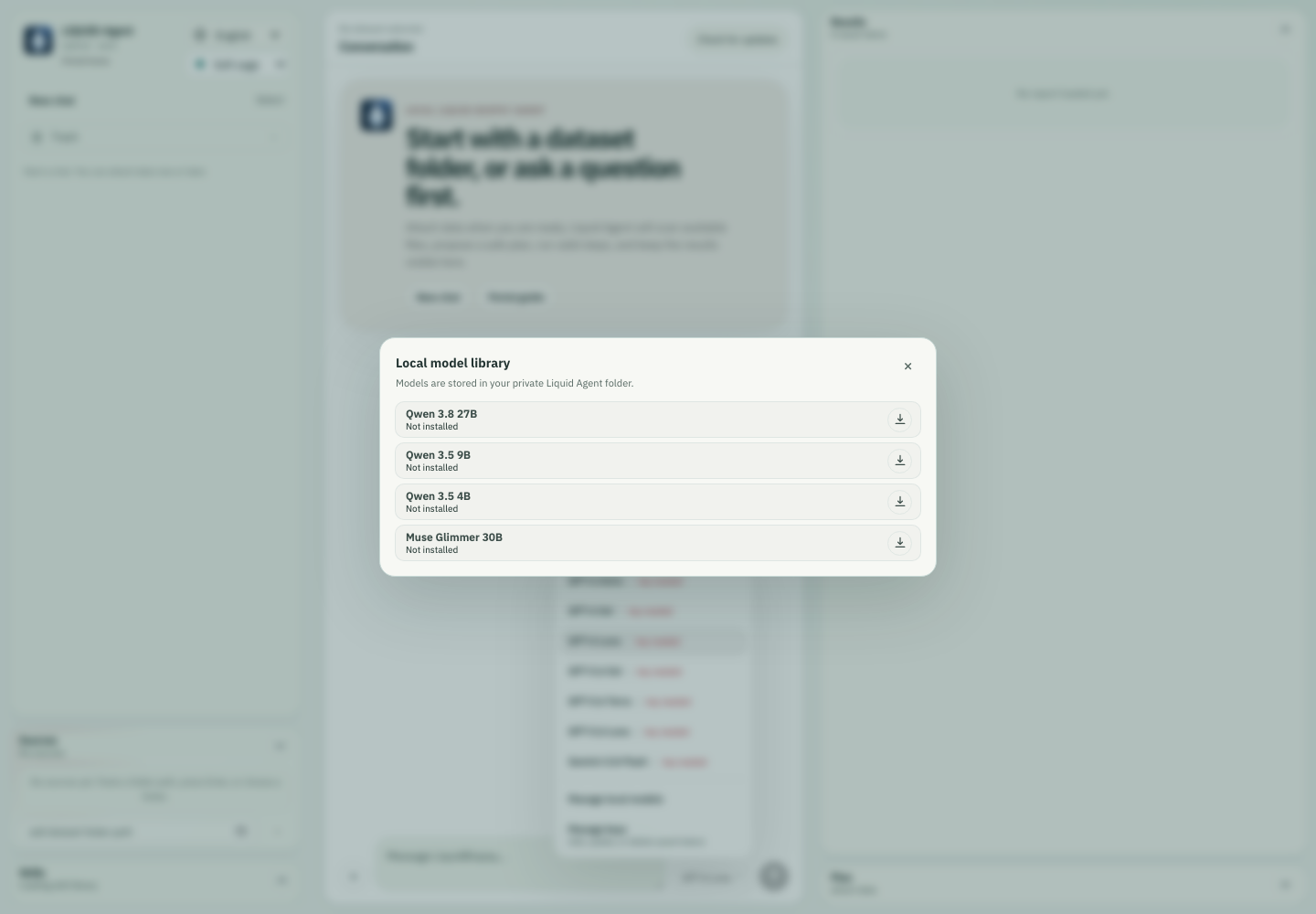
Manage local models opens the reviewed, hardware-screened library. Eligible models can be installed, paused, continued or abandoned; installed profiles can be explicitly selected. Model storage is separate from research datasets, and changing a profile preserves saved cloud configuration.
Isolated release-interface check: the catalog and runtime are test fixtures; this image shows the library before installation. It does not claim that these weights were downloaded or that every listed model has passed scientific or hardware benchmarks.
Install and manage local models
10. Return to work already done
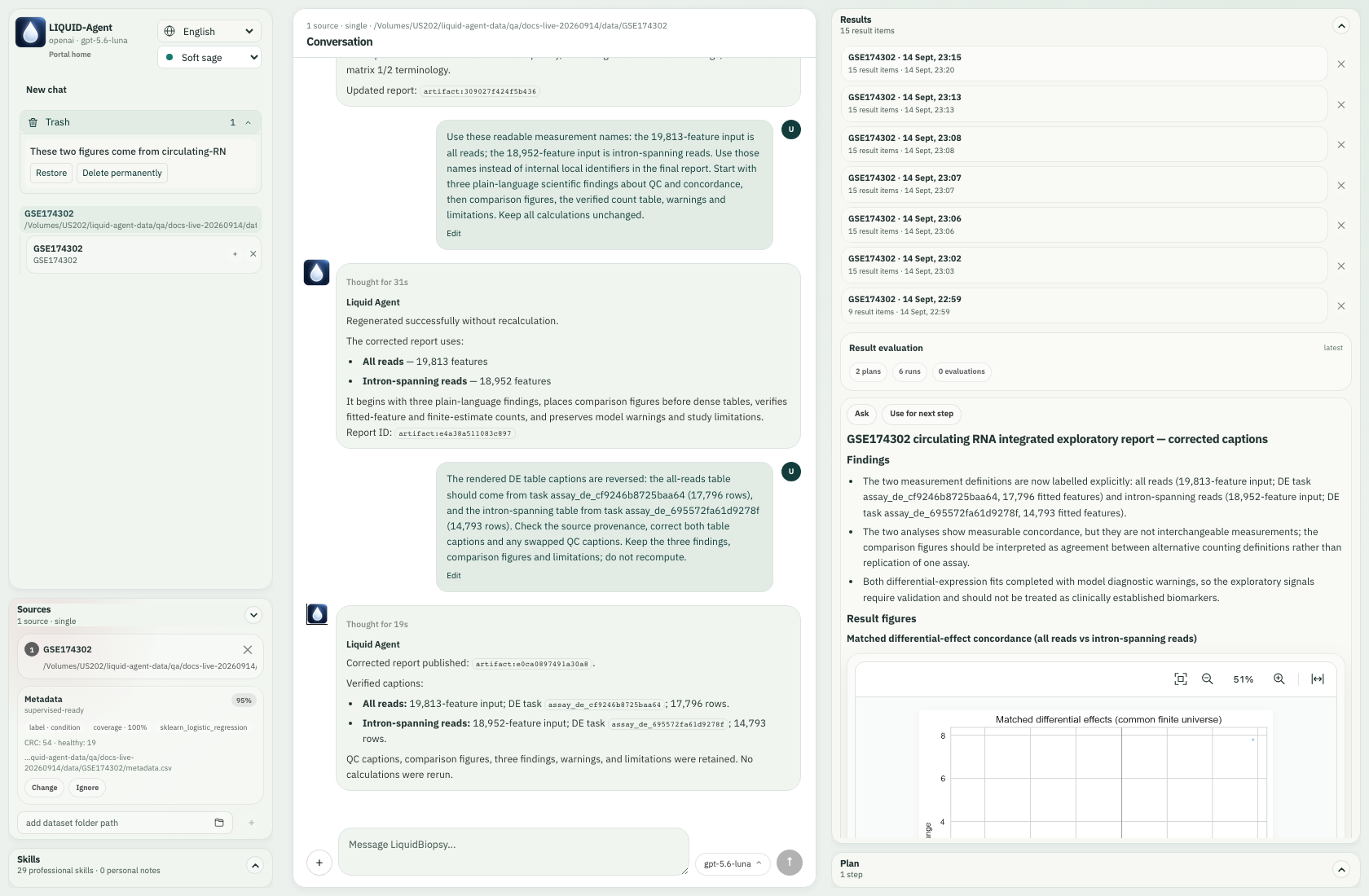
Results history retains earlier reports, while Trash → Restore returns an archived conversation. This capture shows the isolated image conversation in Trash; the original study inputs were not deleted. Permanent deletion is a separate action.
Recover and restore a conversation
Explore the release in detail
These scenes illustrate the interaction loop; they are not an exhaustive assay benchmark or a clinical-validation claim. Use the V0.1 summary for the release boundary, natural-language examples for English requests and the real cfRNA walkthrough for the full scientific example. The Docs language control presents this gallery in English or Simplified Chinese; changing that setting does not determine the agent's response language.