OpenAI GPT Configuration
Liquid Agent defaults to the OpenAI GPT API, through the Responses API at
https://api.openai.com/v1. Web and CLI share the Codex conversation controller,
credential/model policy, and LangGraph scientific execution layer. Direct SDK
requests remain available to internal services and explicit legacy diagnostics.
Changing models does not replace liquid-biopsy knowledge, skills,
dataset context, tool checks, cancellation, or user review between steps.
In the same conversation, switching GPT models, providers or local profiles keeps the safe conversation context, attachments, current plan, completed results and task memory. Earlier relevant decisions can be retrieved from task checkpoints when they fall outside the model's recent context. This is retained task evidence, not a promise that every old message fits verbatim in every model's prompt. Real history edits invalidate superseded context; provider privacy rules still apply.
For explicit on-device inference, see Local Language Models. Local profiles keep their endpoint/authentication separate from these cloud settings.
Model Selection
The reviewed catalog lives in agent/openai_models.py. As of 4 October 2026:
| Web model name | Selection | Policy |
|---|---|---|
| GPT-6.1 Sol | gpt-6.1-sol |
Explicit GPT-6.1 Sol choice |
| GPT-6 Astra | gpt-6-astra |
Explicit flagship choice; higher token prices |
| GPT-6 Sol | gpt-6-sol |
Explicit higher-capability choice for complex agentic work |
| GPT-6 Luna | auto |
Existing economical default; unchanged by this catalog update |
| GPT-5.6 Sol | gpt-5.6-sol |
Explicit GPT-5.6 Sol choice |
| GPT-5.6 Terra | gpt-5.6-terra |
Explicit GPT-5.6 Terra choice |
| GPT-5.6 Luna | gpt-5.6-luna |
Explicit GPT-5.6 Luna choice |
The Web menu shows each model name in bold with its key status on the same line, separated by a small grey divider, without tier headings. An unconfigured key is shown in red. Its GPT order is GPT-6.1 Sol, GPT-6 Astra, GPT-6 Sol, GPT-6 Luna, GPT-5.6 Sol, GPT-5.6 Terra, GPT-5.6 Luna. The GPT-6 Luna entry selects auto; menu order does not change the default.
The catalog includes the existing GPT-6 choices alongside GPT-5.6 Luna, Terra,
Sol and GPT-6.1 Sol. auto still resolves to gpt-6-luna; all other entries are
opt-in and use the same OpenAI key. Existing explicit pins, including an older
GPT model ID, are not silently rewritten. Tool-capable agent turns run through
the Responses API. Requests use low reasoning effort and omit unsupported
sampling parameters. A menu entry does not grant account access or prove that a
particular key can call the model. Account access and pricing can change.
The authoritative references are the model catalog,
pricing, and
latest-model guide.
The added IDs are documented in the official GPT-5.6 Luna,
GPT-5.6 Terra,
GPT-5.6 Sol, and
GPT-6.1 Sol pages.
The Web picker obtains its catalog from /api/llm/config; it does not carry a
second list of model IDs. The CLI also accepts a pinned gpt-* model ID.
Saved explicit choices remain unchanged when the economical catalog is updated.
Catalog and adapter updates take effect after restarting the local service;
running analyses are not hot-swapped to a different implementation mid-task.
If a model is unavailable, the application reports the error. It never silently
switches providers or upgrades to a more expensive model.
A new model release does not necessarily require an API adapter rewrite. When
the endpoint and supported request parameters remain compatible, the change
can be limited to the reviewed selection catalog; the CLI already accepts
explicit gpt-* IDs. Endpoint or parameter changes, SDK incompatibilities and
model deprecations require a targeted compatibility review and, when necessary,
adapter changes. The application does not automatically discover or select new
models at runtime. Updating the catalog does not change auto or saved pins.
/llm models
/llm key
/llm use auto
/llm save
For an explicit higher tier:
/llm use gpt-6-astra
/llm save
liquid-agent llm-configure provides interactive setup. Prefer its hidden key
prompt or OPENAI_API_KEY over putting a secret in a command-line argument.
The model choices scroll separately from Manage local models and Manage keys, which remain visible at the bottom of the menu. The Gemini display name is Gemini-3.8-Flash; its API model ID remains gemini-3.8-flash.
Optional Gemini
The supported Gemini option is gemini-3.8-flash. Google lists free
standard-API input/output tokens and
support for function calling and structured outputs. Its agent-workflow
capabilities make it our preferred free-tier candidate, based on the official
model description,
not a local model benchmark. This is not a guaranteed-free model switch: the Google
project's billing tier, eligibility and current quotas determine access and charges.
Check pricing and your limits in
Google AI Studio. Do not enable billing
just to follow this tutorial.
For Free Tier use, create or select a separate Google project whose Billing Tier in AI Studio is Free Tier, with billing disabled, and use that project's Gemini key. Keep billing disabled; do not enable paid billing or auto-reload to resolve a quota error. A saved model choice cannot inspect or enforce Google billing. This is separate from your OpenAI key. Quota errors stop the request without a paid fallback; free capacity and continued availability are not guaranteed. See Google billing.
Use public or non-sensitive synthetic data only. Unpaid prompts and responses may be used to improve Google products. Google's terms include regional restrictions and paid-service requirements for API clients in the EEA, Switzerland and UK. The local privacy gateway remains active, but an aggregate summary is not automatically suitable for external disclosure.
In Web, select gemini-3.8-flash from the composer model menu, read the notice and enter a Gemini API key. Manage keys has a provider selector for adding/replacing each provider's key independently. Deleting one provider's key does not delete the other. Configuration does not verify Google billing or prove that the key works; the next request reports actual API errors.
The Web menu shows one Gemini entry. Previously saved gemini-3.5-flash-lite selections remain pinned; key management preserves them, but the older model is no longer a separate Web menu item.
Choose the recommended model explicitly to upgrade; existing keys are retained.
With no Gemini model selected, /llm use gemini resolves to gemini-3.8-flash.
OpenAI remains the product default.
In the terminal shell:
/llm key gemini
/llm use gemini
/llm save
Alternatively, run liquid-agent llm-configure --llm-provider gemini for a
hidden key prompt, or set GEMINI_API_KEY (GOOGLE_API_KEY is also recognized).
Use /llm use auto to return explicitly to GPT, and /llm delete gemini to
remove the Gemini key and block environment-key reactivation.
Gemini uses a native function-calling adapter, not the Codex Responses transport. It shares the same conversation controller, skills, privacy gateway, validated local tools, LangGraph jobs and report/history ownership. It does not implement a separate fixed workflow. Native tool-call signatures remain in the local conversation transcript for continuation. Stop cancels the active request without closing the Web service. Quota/authentication failures are reported, with no automatic retries, provider fallback, billing activation or model upgrade.
Credentials and Migration
Use Manage keys in the Web model menu to add, replace, or delete the OpenAI key. One key serves every GPT tier. Empty input on a model change keeps the saved key. A rejected configuration does not close the dialog or pretend it succeeded. Saving a key stores it; it does not prove that OpenAI accepts it or that the account has credit. Request errors are shown when calling the API.
Configuration is stored in llm_config.json in the OS user configuration folder:
- macOS:
~/Library/Application Support/liquidbiopsy_agent/ - Linux:
~/.config/liquidbiopsy_agent/ - Windows:
%LOCALAPPDATA%/liquidbiopsy_agent/
Writes use a private temporary file, an atomic replacement, and owner-only file
permissions on POSIX. Saved keys use authenticated Fernet encryption. The master key stays in the native OS credential store; a locked or unavailable store fails closed. Protect your user account and backups. API responses to the UI contain key-presence flags, never
the saved secret. Keys are not stored in browser persistence or graph checkpoints.
LIQUIDBIOPSY_CONFIG_DIR overrides the configuration folder for both CLI and
Web, including a directory on a data disk. Choose a private directory outside
the source checkout and any Git repository. For example, on macOS:
export LIQUIDBIOPSY_CONFIG_DIR="/Volumes/YourDataDisk/liquid-agent-private/config"
liquid-agent web
Use the same environment setting when launching liquid-agent in the terminal.
Keys entered afterward are saved in that directory's llm_config.json. Setting
this variable does not move or delete existing credentials; an empty destination
requires entering the key again. Keep the disk mounted when using this setting.
The default remains the OS user configuration folder outside the source checkout.
Local .env files and llm_config.json are also excluded by Git ignore rules;
these rules do not remove files already committed to Git history.
Legacy configuration is migrated on read. Pre-version-3 credentials removed by
the OpenAI-only migration are not revived. New version-3 configurations retain
independent OpenAI and explicitly added Gemini entries; unsupported providers,
proxy endpoints and local-model paths are removed. Existing pinned GPT IDs remain pinned. Select
auto to adopt the economical default. Generic legacy API-key and base-URL
environment variables are ignored, preventing accidental cross-provider routing.
The launcher preserves a caller-supplied OPENAI_API_KEY across Conda activation,
so a stale Conda environment variable cannot replace it. Saved OpenAI settings
still take precedence over environment keys. Regenerate installed command shims
with the installer after upgrading if they predate this launch-environment fix.
Deleting the key disables subsequent requests, including from existing client
objects. It also records that OPENAI_API_KEY must not be silently reactivated.
Add a new key to re-enable access. This does not remove the variable from your
shell. It also cannot recall a request already sent to OpenAI. Model changes
affect the selected session and the default for new sessions, not other active
sessions' explicit model choices.
Requests and Failure Handling
The direct Python SDK adapter uses low reasoning effort for GPT-5 and GPT-6 requests.
Its default output budget is 2,400 tokens, including reasoning; incomplete output
is rejected instead of being dispatched as a partial tool decision. Optional
LIQUIDBIOPSY_LLM_MAX_TOKENS and LIQUIDBIOPSY_LLM_TIMEOUT settings adjust the
budget and per-request timeout. Transient failures get one same-model retry by
default, then a short cooldown. Authentication failures are not retried against
another model or provider.
The direct SDK adapter sets store=false; Liquid Agent supplies its local
conversation and domain context explicitly. This flag does not promise zero
retention by OpenAI.
Review OpenAI data controls
before sending sensitive research data. The existing local scientific tools still
process data locally; model prompts can contain the user's questions, dataset
metadata, selected summaries, and retrieved project/skill context.
The Codex conversation runtime manages its own multi-turn
Responses requests. It uses the same configured API key/model and low reasoning
effort, but the SDK adapter's LIQUIDBIOPSY_LLM_MAX_TOKENS, timeout, cooldown,
and store=false implementation must not be assumed to govern Codex requests.
Codex has separate turn/tool-call limits and keeps local conversation state.
Verify the deployed Codex version and OpenAI account data controls before sending
sensitive research information; this integration does not certify zero retention.
Offline diagnostics remain available through /llm off. Any deterministic
recovery information is not a successful live GPT answer.
Key-management entry in the live workspace
Open the model selector beside the composer, then Manage keys. The example below shows an empty input so no credential is visible.
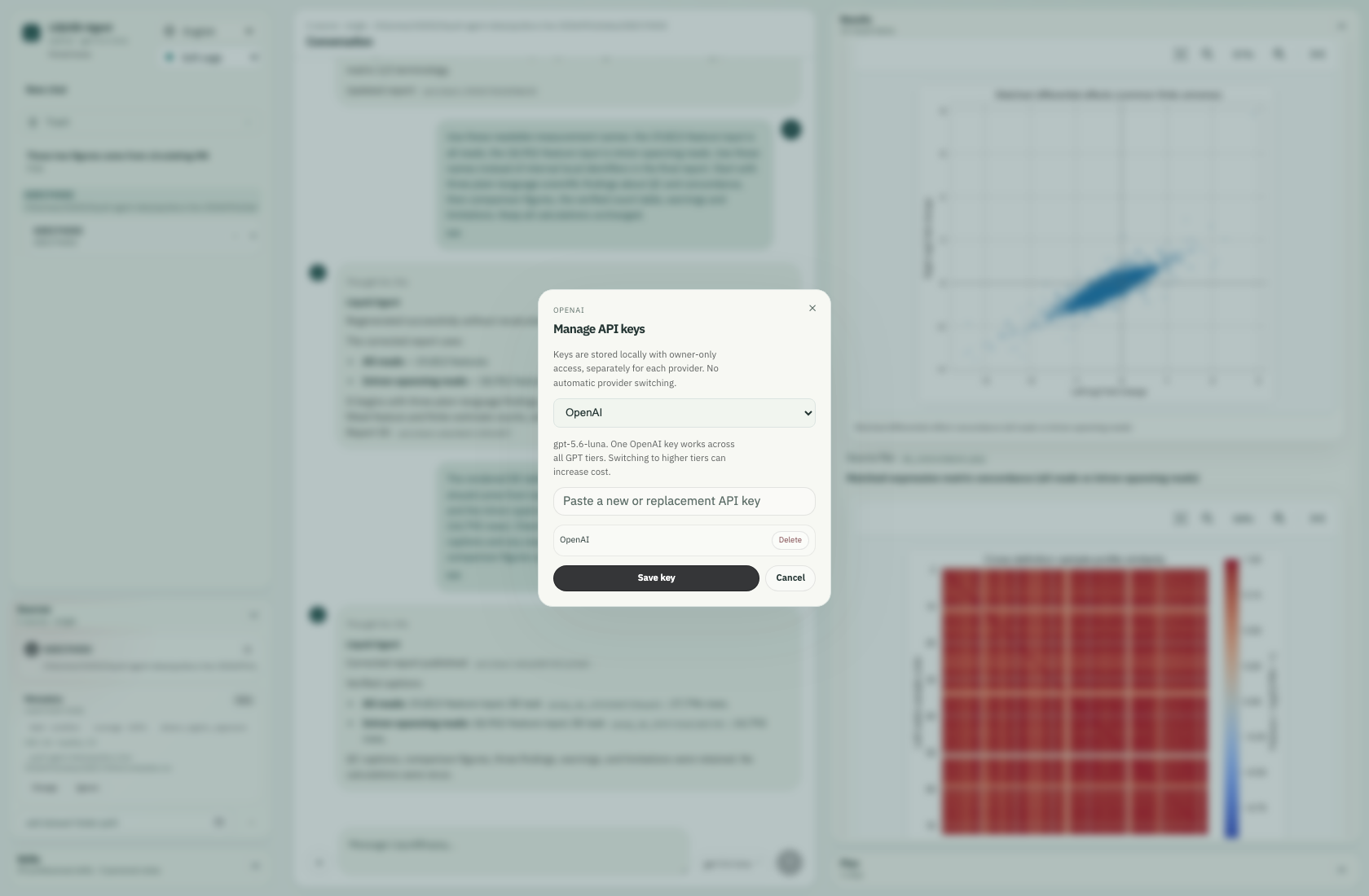
The real key-management dialog; credentials are not visible.